コマンドラインから高度なプロット
この投稿は、MATLABからカスタムプロットを受け付けています。 EEGLABメニュー
目次
- トピックス
すべての電極上の時間周波数プロット
この例では、低レベルの電力の一部を示しています 現在利用可能な機能の範囲を超えて行くスクリプト グラフィカル 以下は、このスクリプトをチュートリアルのepochedデータセットで実行します。 参照: tftopo.mの 関数は強力な機能です すべてのチャネルで時間の頻度分解をプロットできます。
% Compute a time-frequency decomposition for every electrode
eeglab; close; % add path
eeglabp = fileparts(which('eeglab.m'));
EEG = pop_loadset(fullfile(eeglabp, 'sample_data', 'eeglab_data_epochs_ica.set'));
for elec = 1:EEG.nbchan
    [ersp,itc,powbase,times,freqs,erspboot,itcboot] = pop_newtimef(EEG, …
    1, elec, [EEG.xmin EEG.xmax]*1000, [3 0.5], 'maxfreq', 50, 'padratio', 16, ...
    'plotphase', 'off', 'timesout', 60, 'alpha', .05, 'plotersp','off', 'plotitc','off');
    if elec == 1  % create empty arrays if first electrode
        allersp = zeros([ size(ersp) EEG.nbchan]);
        allitc = zeros([ size(itc) EEG.nbchan]);
        allpowbase = zeros([ size(powbase) EEG.nbchan]);
        alltimes = zeros([ size(times) EEG.nbchan]);
        allfreqs = zeros([ size(freqs) EEG.nbchan]);
        allerspboot = zeros([ size(erspboot) EEG.nbchan]);
        allitcboot = zeros([ size(itcboot) EEG.nbchan]);
    end;
    allersp (:,:,elec) = ersp;
    allitc (:,:,elec) = itc;
    allpowbase (:,:,elec) = powbase;
    alltimes (:,:,elec) = times;
    allfreqs (:,:,elec) = freqs;
    allerspboot (:,:,elec) = erspboot;
    allitcboot (:,:,elec) = itcboot;
end;
% Plot a tftopo() figure summarizing all the time/frequency transforms
figure;
tftopo(allersp,alltimes(:,:,1),allfreqs(:,:,1),'mode','ave','limits', …
[nan nan nan 35 -1.5 1.5],'signifs', allerspboot, 'sigthresh', [6], 'timefreqs', ...
[400 8; 350 14; 500 24; 1050 11], 'chanlocs', EEG.chanlocs);
スクリプトは、次の図を生成します。
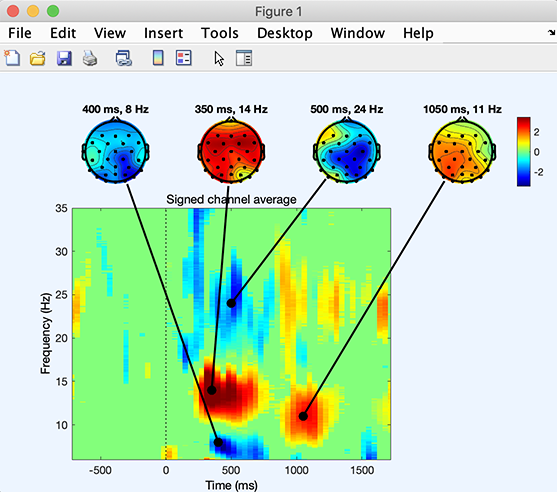
この関数は、CenterP の出力を、バイナリ統計解析で行います。
スカルプトポグラフィにおけるプロット対策
プロットの時間頻度分解
参照: 特注品 関数は強力な機能です すべてのチャネルおよびコンポーネントのあらゆる測定をプロットできます。 例えば、下のコードは時間頻度の分解をのためのプロットすることを可能にします すべてのデータチャネル。
eeglab; close; % add path
eeglabp = fileparts(which('eeglab.m'));
EEG = pop_loadset(fullfile(eeglabp, 'sample_data', 'eeglab_data_epochs_ica.set'));
figure; metaplottopo( EEG.data, 'plotfunc', 'newtimef', 'chanlocs', EEG.chanlocs, 'plotargs', ...
                   {EEG.pnts, [EEG.xmin EEG.xmax]*1000, EEG.srate, [0], 'plotitc', 'off', 'ntimesout', 50, 'padratio', 1});

PlotのERP
次の例では、すべてのデータをERPimage にプロットする。 ERPimage では、各関数の軸線が点在しています。 必要に応じて、何百ものチャンネルをプロットするのが便利です。 ICA交換する EEGデータ と EEG.icaact と ‘chanlocs’ は、外に渡します。
figure; metaplottopo( EEG.data, 'plotfunc', 'erpimage', 'chanlocs', EEG.chanlocs, 'plotargs', ...
         { eeg_getepochevent( EEG, {'rt'},[],'latency') linspace(EEG.xmin*1000, EEG.xmax*1000, EEG.pnts) '' 10 0 });

スカルプトポグラフィアニメーション制作
このページで使用されるスクリプトは、 m 点
eegmovie関数2Dspcaltopoグラフィ アニメーション
scalpMap アニメーション へスキップ(limited) eegmovie。 m 点 コマンドラインから。 例えば、レイテンシー範囲のムービーを作るために-100ミリ秒から600ミリ秒、タイプ:
%% Simple 2-D movie
eeglab; close; % add path
eeglabp = fileparts(which('eeglab.m'));
EEG = pop_loadset(fullfile(eeglabp, 'sample_data', 'eeglab_data_epochs_ica.set'));

% Above, convert latencies in ms to data point indices
pnts1 = round(eeg_lat2point(-100/1000, 1, EEG.srate, [EEG.xmin EEG.xmax]));
pnts2 = round(eeg_lat2point( 600/1000, 1, EEG.srate, [EEG.xmin EEG.xmax]));
scalpERP = mean(EEG.data(:,pnts1:pnts2),3);

% Smooth data
for iChan = 1:size(scalpERP,1)
    scalpERP(iChan,:) = conv(scalpERP(iChan,:) ,ones(1,5)/5, 'same');
end

% 2-D movie
figure; [Movie,Colormap] = eegmovie(scalpERP, EEG.srate, EEG.chanlocs, 'framenum', 'off', 'vert', 0, 'startsec', -0.1, 'topoplotopt', {'numcontour' 0});
seemovie(Movie,-5,Colormap);

% save movie
vidObj = VideoWriter('erpmovie2d.mp4', 'MPEG-4');
open(vidObj);
writeVideo(vidObj, Movie);
close(vidObj);
3DヘッドプロットでERPをプロットする機能
eegmovie関数3Dsプカルトポグラフィ
以下のコードは、3Dヘッドモデル上にERPの時間変化を描画し、動画として保存する簡単な例です。
%% Simple 3-D movie
% Use the graphic interface to coregister your head model with your electrode positions
headplotparams1 = { 'meshfile', 'mheadnew.mat'       , 'transform', [0.664455     -3.39403     -14.2521  -0.00241453     0.015519     -1.55584           11      10.1455           12] };
headplotparams2 = { 'meshfile', 'colin27headmesh.mat', 'transform', [0          -13            0          0.1            0        -1.57         11.7         12.5           12] };
headplotparams  = headplotparams1; % switch here between 1 and 2

% set up the spline file
headplot('setup', EEG.chanlocs, 'STUDY_headplot.spl', headplotparams{:}); close

% check scalp topo and head topo
figure; headplot(scalpERP(:,end-50), 'STUDY_headplot.spl', headplotparams{:}, 'maplimits', 'absmax', 'lighting', 'on');
figure; topoplot(scalpERP(:,end-50), EEG.chanlocs);
figure('color', 'w'); [Movie,Colormap] = eegmovie( scalpERP, EEG.srate, EEG.chanlocs, 'framenum', 'off', 'vert', 0, 'startsec', -0.1, 'mode', '3d', 'headplotopt', { headplotparams{:}, 'material', 'metal'}, 'camerapath', [-127 2 30 0]);
seemovie(Movie,-5,Colormap);

% save movie
vidObj = VideoWriter('erpmovie3d1.mp4', 'MPEG-4');
open(vidObj);
writeVideo(vidObj, Movie);
close(vidObj);
「ヘッドプラム = headplotparams1;」を「headplotparams = headplotparams2;」に改行して、ヘッドモデルをモデル化します。
次のセクションに示すように映画用のフレームを作成することもできます。
フレームから映画を作る
別のソリューションは、映画に一連の画像を組み立てることです。 例:
%% Using topoplot to make movie frames
vidObj = VideoWriter('erpmovietopoplot.mp4', 'MPEG-4');
open(vidObj);
counter = 0;
for latency = -100:10:600 %-100 ms to 1000 ms with 10 time steps
    figure; pop_topoplot(EEG,1,latency, 'My movie', [] ,'electrodes', 'off'); % plot'
    currFrame = getframe(gcf);
    writeVideo(vidObj,currFrame);
    close;  % close current figure
end
close(vidObj);